Singapore
Hong Kong
United States of America
United Kingdom
Poland
Japan
Iceland
French Guiana
Ireland
China
Indonesia
India
Dominican Republic
South Africa
France
Thailand
Nigeria
Kenya
Mexico
United Republic of Tanzania
Venezuela (Bolivarian Republic of)
Bangladesh
Cameroon
Brazil
Saudi Arabia
Philippines
Egypt
Ghana
Haiti
Senegal
Republic of the Congo
Nepal
Libya
Malaysia
Cuba
Angola
Netherlands
Guatemala
Togo
Finland
Vietnam
Sri Lanka
Burkina Faso
Sierra Leone
Colombia
Uganda
Argentina
Trinidad and Tobago
Cambodia
Algeria
Jamaica
Kuwait
United Arab Emirates
Italy
Ethiopia
Israel
Nicaragua
Mozambique
Belize
El Salvador
Malawi
Qatar
Iraq
Liberia
Uzbekistan
Yemen
Honduras
Afghanistan
Morocco
Lebanon
Uruguay
Tunisia
Zambia
Peru
Mali
Lao People's Democratic Republic
Sudan
Germany
Jordan
Gambia
Myanmar
Rwanda
Panama
Equatorial Guinea
Commonwealth of The Bahamas
Tajikistan
Botswana
Papua New Guinea
Greece
Guinea-Bissau
Bhutan
Portugal
Kongo
Spain
Guinea
Serbia
Eswatini
Zimbabwe
Czechia
Chad
Republic of Moldova
Turkey
Slovakia
Saint Kitts and Nevis
Timor-Leste
Bolivia (Plurinational State of)
Belgium
Romania
Central African Republic
Bosnia and Herzegovina
Namibia
Mauritania
Mongolia
Slovenia
South Sudan
Norway
Maldives
Turkmenistan
Antigua and Barbuda
Turks and Caicos Islands
Oman
Grenada
Armenia
Paraguay
Kyrgyzstan
New Caledonia
Taiwan, Province of China
Azerbaijan
Switzerland
Hungary
Guadeloupe
Saint Vincent and the Grenadines
North Macedonia
Niger
Austria
Cabo Verde
Burundi
Australia
Bulgaria
Faroe Islands
Palestine
Martinique
Georgia
Côte d'Ivoire
Gabon
Macao
Albania
Luxembourg
Lithuania
Barbados
Denmark
Cyprus
Somalia
Latvia
Suriname
Solomon Islands
Benin
Bahrain
Sweden
Estonia
Saint Lucia
Mauritius
Chile
New Zealand
Comoros
Costa Rica
Réunion
Lesotho
Guyana
Ecuador
Puerto Rico
Croatia
Madagascar
Pakistan
Iran
American Samoa
South Korea
Russia
Belarus
شراء أرقام افتراضية لـ 12306
يوفر HidSim أرقام هاتف افتراضية مؤقتة وآمنة لاستلام الرسائل القصيرة عبر الإنترنت فورًا. استخدم أرقامنا للتحقق عبر SMS ورموز OTP أثناء التسجيل على منصات شهيرة مثل واتساب وأمازون وفيسبوك وتويتر وغيرها. استمتع باستلام رسائل مجهول وموثوق مع خدمة الأرقام الافتراضية من HidSim لتجربة تحقق سهلة وخالية من التعقيد.
تسليم فوري
آمن ومجهول
العملات المشفرة مقبولة
ادفع فقط مقابل الرموز المستلمة
الأسئلة الشائعة
إجابات سريعة حول شراء الأرقام واستلام الرموز والاسترداد ومدة التفعيل.
كيف أحصل على رقم افتراضي؟
يمكنك شحن رصيدك بالعملات المشفرة أو بطاقات Visa. كما يمكنك تثبيت تطبيقنا من App Store أو Google Play وشراء حزم العملات داخل التطبيق. بعد الشحن، اختر الخدمة والدولة المطلوبة ثم اشترِ الأرقام الافتراضية بعملاتك.
ماذا يحدث إذا لم أتلقَّ الرمز؟
قد تكون هناك عدة أسباب مثل مشاكل الشبكة أو تأخير من الخدمة المرسلة. يمكنك إلغاء التفعيل والمحاولة برقم جديد؛ سيتم ردّ المبلغ تلقائيًا إلى رصيدك. استخدام VPN أو وكيل من بلد الرقم قد يساعد على تحسين التسليم.
كم مدة توفر الأرقام لي؟
عند شراء رقم تملكه لمدة 15 إلى 20 دقيقة تقريبًا حسب المزوّد، وتعرض بطاقة الرقم الوقت المتبقي. خلال هذه الفترة أدخل الرقم في الخدمة المطلوبة. سيراقب HidSim وصول الرمز ويعرضه على بطاقة الرقم في «أرقامي». عند وصول الرمز يكتمل الطلب. يمكن لبعض الأرقام استلام رمز آخر قبل انتهاء وقتها، وعندها تعرض بطاقتها طلب رمز آخر.
لماذا حُظر رقمي من قِبل خدمة؟
قد يحدث بسبب نمط الاستخدام أو مشاكل عنوان IP أو اعتباره آليًا. لتفادي ذلك استخدم اسمًا وصورة حقيقية وتفاعل بشكل طبيعي وتجنّب الحصول على أرقام بسرعة متتالية، وفكّر باستخدام VPN مطابق لبلد الخدمة.
لماذا لا أتلقى رمزًا لخدمات تيليجرام؟
لأول تسجيل دخول في تيليجرام تجنّب استخدام اللابتوب أو الأجهزة اللوحية. استخدم هاتفًا محمولًا لإنشاء الحساب أولاً. بعد إكمال التسجيل يمكنك نقل الحساب لأجهزة أخرى.
هل يمكنني تلقي رمز لنفس الرقم أكثر من مرة؟
في كثير من الأحيان نعم. إذا سمح مزوّد الرقم برسالة أخرى عليه، تعرض بطاقة الرقم في أرقامي زر طلب رمز آخر بعد وصول الرمز الأول وحتى انتهاء وقت الرقم. الخدمة مجانية: اضغط عليه ثم اطلب من الخدمة إرسال رمزها مرة أخرى. ينتظر الرقم حتى 10 دقائق إضافية، ويظهر الرمز الجديد على البطاقة نفسها. إذا لم يظهر الزر فلا يمكن لهذا الرقم استلام رمز آخر، وستحتاج إلى رقم جديد. الرقم الذي استلم رمزًا لا يُسترد، حتى إن لم يصل رمز ثانٍ.
ماذا أفعل إذا لم تصل رموز الرسائل القصيرة في منطقتي أو لدى مزوّدي؟
إذا حاولت عدة مرات ولم يصل أي رمز تحقق عبر الرسائل القصيرة، فاضغط استرداد على بطاقة الرقم عندما يُفتح (بعد 5 دقائق من شراء الرقم)، أو اتركه حتى تنتهي مدته فيُسترد تلقائيًا، ثم جرّب رقمًا جديدًا؛ وإذا لم تصل الرموز بعد ذلك، فاختر دولة أخرى. قد يتأثر وصول الرمز بالخدمة المرسِلة أو بالتوجيه الإقليمي أو بقيود شركات الاتصال أو بتأخيرات مؤقتة في الشبكة. إذا استمرت المشكلة، فأنشئ تذكرة دعم واذكر فيها اسم الخدمة والدولة والرقم الذي اشتريته والوقت التقريبي لمحاولتك حتى يتمكن فريقنا من فحص المشكلة.
كيف أدفع باستخدام نجوم Telegram؟
شراء العملات عبر Telegram عملية بسيطة من خطوتين:
الخطوة 1: أنشئ الطلب على HidSim
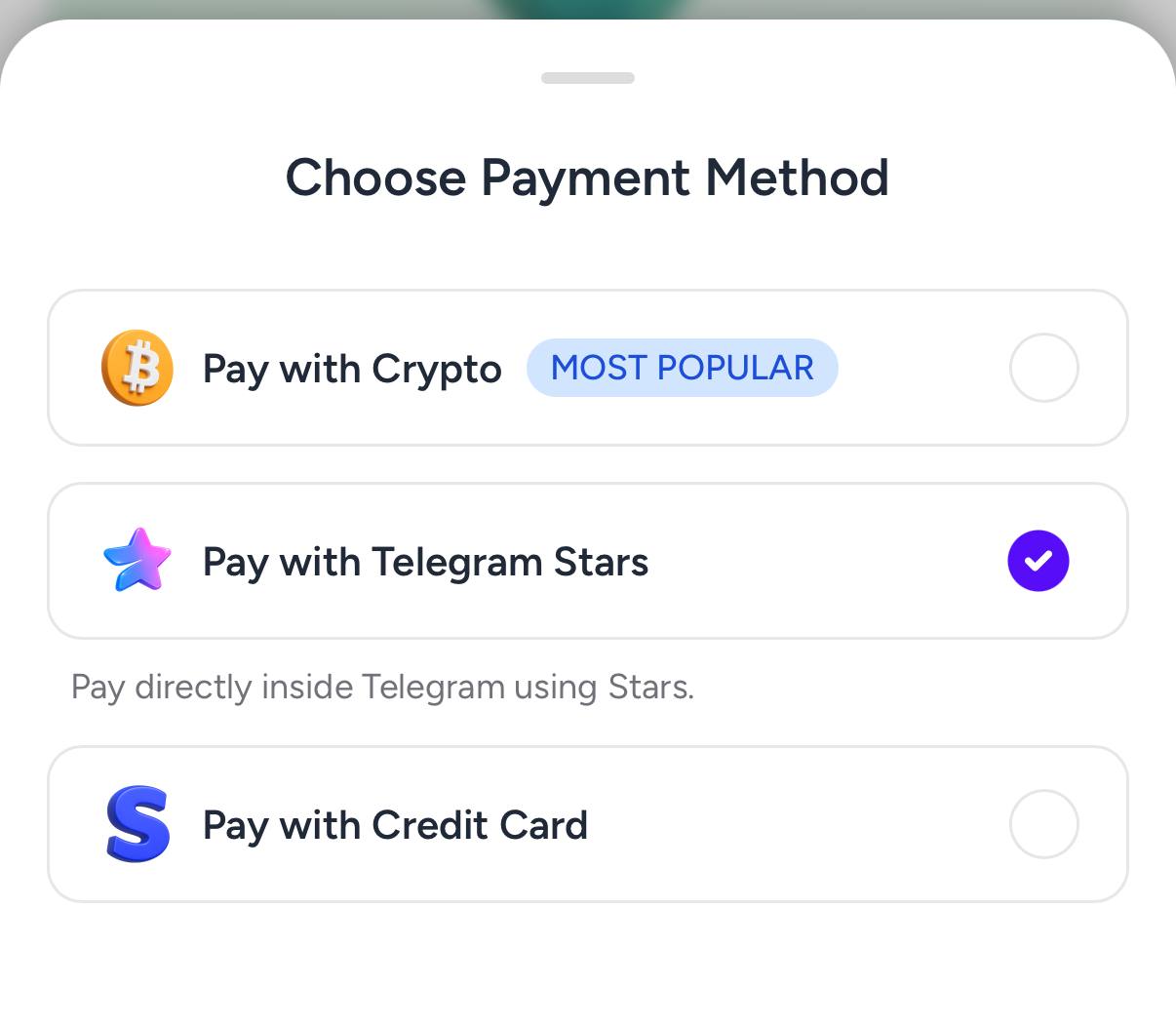
افتح صفحة الشراء واختر حزمتك، ثم اختر الدفع بنجوم Telegram. ينشئ ذلك رابط فاتورة Telegram لطلبك.
 الخطوة 2: اشترِ النجوم في Telegram
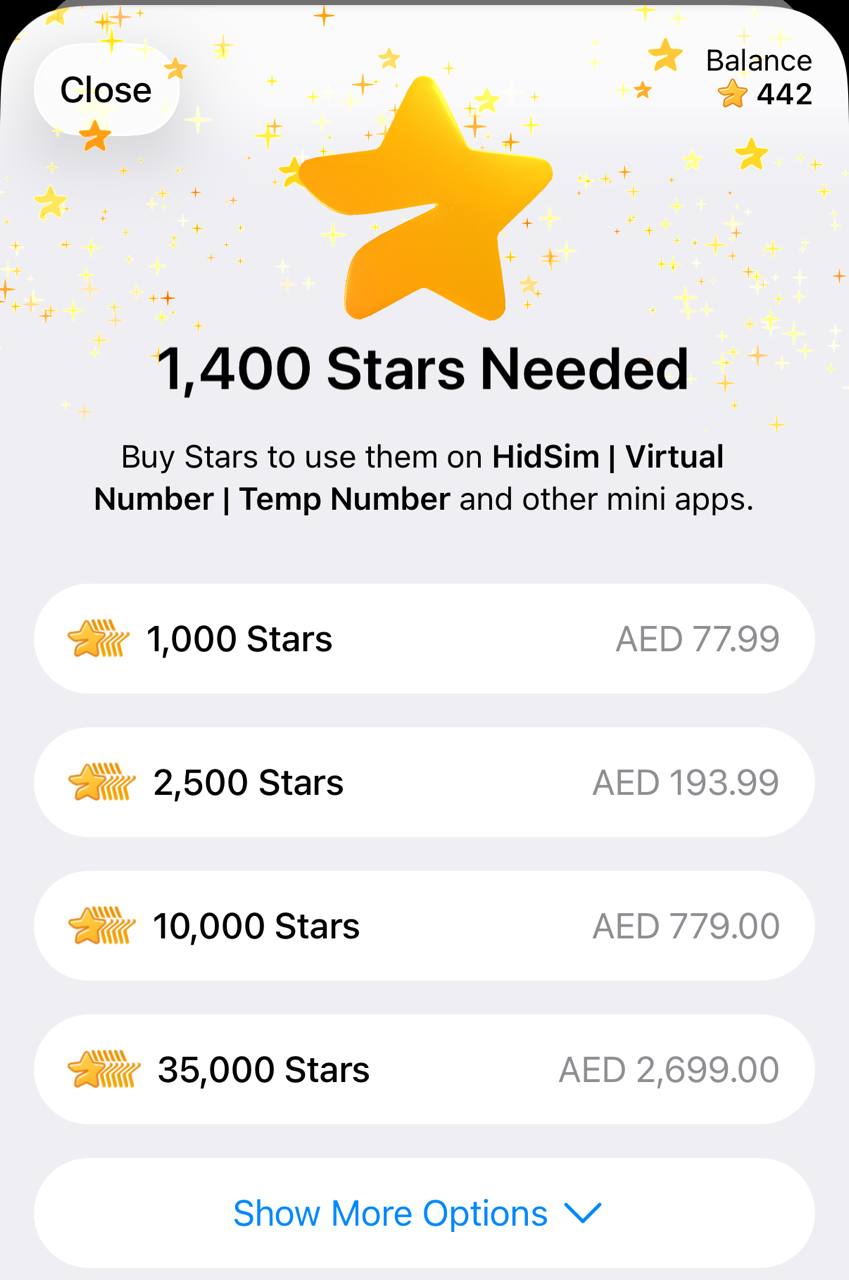
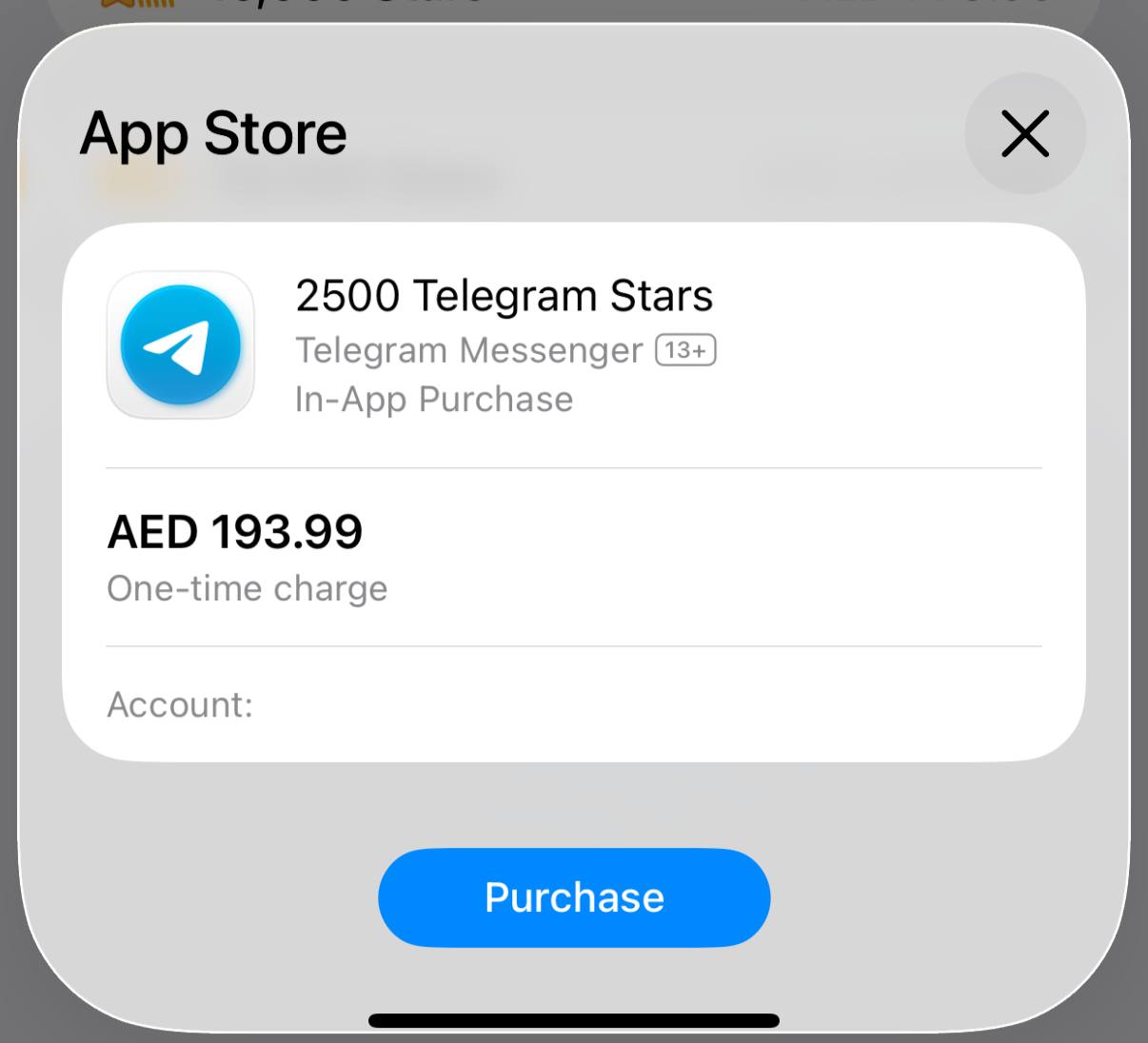
في Telegram، اشترِ النجوم المطلوبة بطريقة الدفع التي تفضلها. إذا كان لديك ما يكفي من النجوم، يمكنك تخطي هذه الخطوة.
 الخطوة 3: ادفع لبوتنا بالنجوم
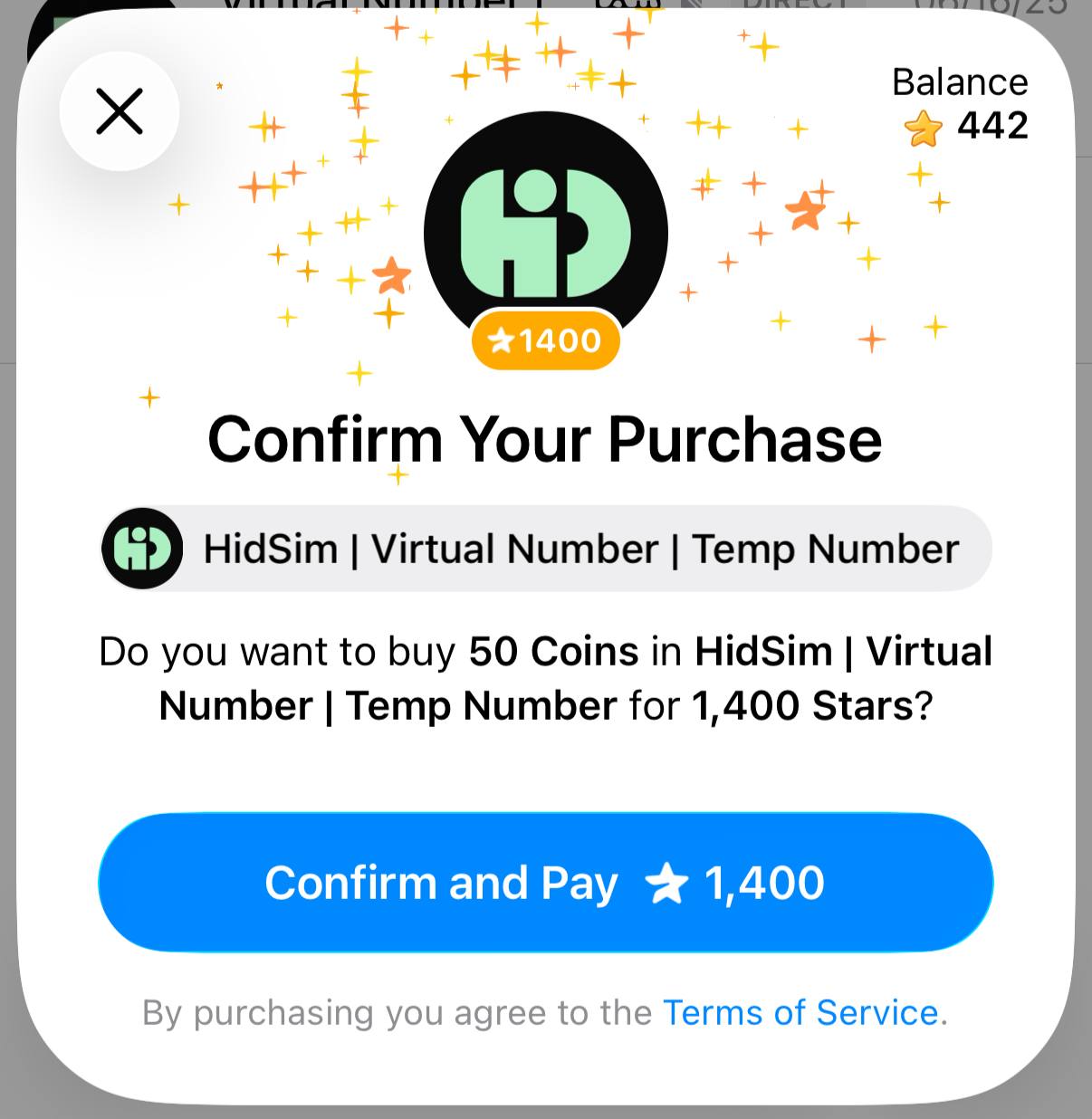
عُد إلى الفاتورة وأكّد الدفع. هذه الخطوة ضرورية لإتمام الطلب وإضافة العملات إلى رصيدك في HidSim.
نصائح
طريقة الدفع هذه لا تتجدد تلقائيًا. إذا لم تظهر العملات بعد ذلك، يرجى التواصل مع الدعم عبر البريد الإلكتروني.
- تشتري النجوم (Stars) عبر @PremiumBot الرسمي في Telegram باستخدام بطاقتك (أو Google Pay أو Apple Pay أو طرق أخرى مدعومة).
- تستخدم تلك النجوم للدفع لبوتنا وإتمام شراء عملات HidSim.
الخطوة 1: أنشئ الطلب على HidSim
افتح صفحة الشراء واختر حزمتك، ثم اختر الدفع بنجوم Telegram. ينشئ ذلك رابط فاتورة Telegram لطلبك.
في Telegram، اشترِ النجوم المطلوبة بطريقة الدفع التي تفضلها. إذا كان لديك ما يكفي من النجوم، يمكنك تخطي هذه الخطوة.
عُد إلى الفاتورة وأكّد الدفع. هذه الخطوة ضرورية لإتمام الطلب وإضافة العملات إلى رصيدك في HidSim.
- إذا لم تُضف العملات، فافتح إعدادات Telegram وتحقق من نجومي لمعرفة ما إذا اكتمل شراء النجوم وما إذا تأكد الدفع بالنجوم لبوتنا.
- إذا فشل الدفع بالبطاقة، فجرّب Apple Pay / Google Pay في تطبيق Telegram على الجوال، أو أعد المحاولة من Telegram Web.
- قد تبدو مشتريات نجوم Telegram أغلى من سعر الموقع الأساسي في بعض المناطق. يعود هذا الفرق إلى رسوم القناة والدفع في Telegram (راجع التوثيق الرسمي للنجوم من Telegram)، وليس إلى رسوم إضافية من HidSim.
طريقة الدفع هذه لا تتجدد تلقائيًا. إذا لم تظهر العملات بعد ذلك، يرجى التواصل مع الدعم عبر البريد الإلكتروني.
هل أستخدم رقم HidSim للتحقق من حساب Apple؟
أرقام HidSim مؤقتة ومخصصة للتحقق لمرة واحدة عبر الرسائل القصيرة فقط. لا ننصح باستخدامها للخدمات الدائمة مثل Apple ID أو الحسابات الأخرى التي قد تحتاج إلى الدخول إليها لاحقًا. إذا طلبت Apple رقم هاتف سيبقى مرتبطًا بحسابك، فاستخدم رقمًا شخصيًا أو طويل الأمد من الدولة الصحيحة بدلًا من رقم HidSim المؤقت.
كيف أختار أفضل رقم لاستلام رمز OTP؟
رتّب المنتجات أولًا حسب الجودة من الأعلى إلى الأدنى، وعند المقارنة بين خيارات متقاربة في الجودة فضّل السعر من الأعلى إلى الأدنى. الأرقام الرخيصة جدًا قد تأتي على الأرجح من نطاقات مستهلكة بكثرة أو مصنّفة كرسائل مزعجة، ما قد يقلل فرصة استلام رمز OTP. إذا لم يصل الرمز، فألغِ التفعيل لاسترداد المبلغ وجرّب خيارًا آخر بجودة أعلى.